
Popup & export settings
What's in the extension popup, and how to set your default export style.
Click the Thumbsy icon in your Chrome toolbar to open the popup. What you see depends on whether you're signed in and on your plan.
Account section
At the top, a status pill shows Free or Pro, next to your avatar and email once signed in. If you're not signed in yet, see Sign in.
TODO: add image — Popup top bar showing account pill and Free/Pro status
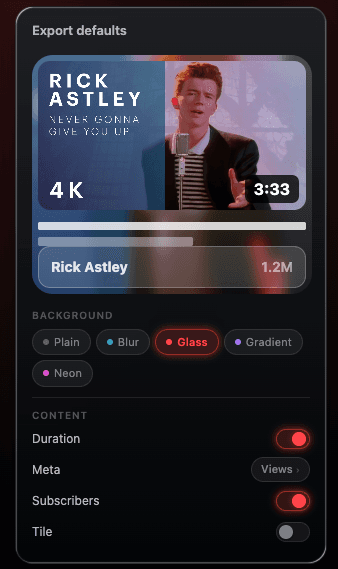
Export defaults
These settings control what Export Showcase and Bulk Download ZIP use by default, so you don't have to re-pick a style every time:
- Background style — Plain, Blur, Glass, Gradient, or Neon
- Background color — for Plain style, pick from 10 preset dark swatches
- Duration badge — on or off
- Meta line — cycles between views, posted date, or off
- Layout — Card or Tile
A live preview at the top of the panel updates as you change settings, and changes save automatically (look for the Saved ✓ confirmation).
Grid export defaults
A second panel controls grid exports specifically:
- Show title — on or off
- Show view count — on or off
These also save automatically and apply to both the Studio's grid export and bulk grid export.
Other links
- Open Library — opens your webapp dashboard
- Upgrade to Pro — opens checkout (free accounts only) — see Upgrading to Pro
- Manage plan — opens your billing portal (Pro accounts only) — see Managing billing
- Sign out — signs the extension out (does not sign out the dashboard separately)