
Context menu actions
The four actions added to every thumbnail's menu on YouTube.
Hover any video thumbnail — on the home feed, in search results, on a channel page, or in the sidebar — and open its menu (the three-dot icon). Thumbsy adds four items to the top of that menu.

Save for later
Saves the video's metadata (title, channel, view count, posted date) straight to your library. Requires you to be signed in — if you're not, Thumbsy shows a sign-in prompt instead of saving.
A small confirmation toast appears once the save completes.
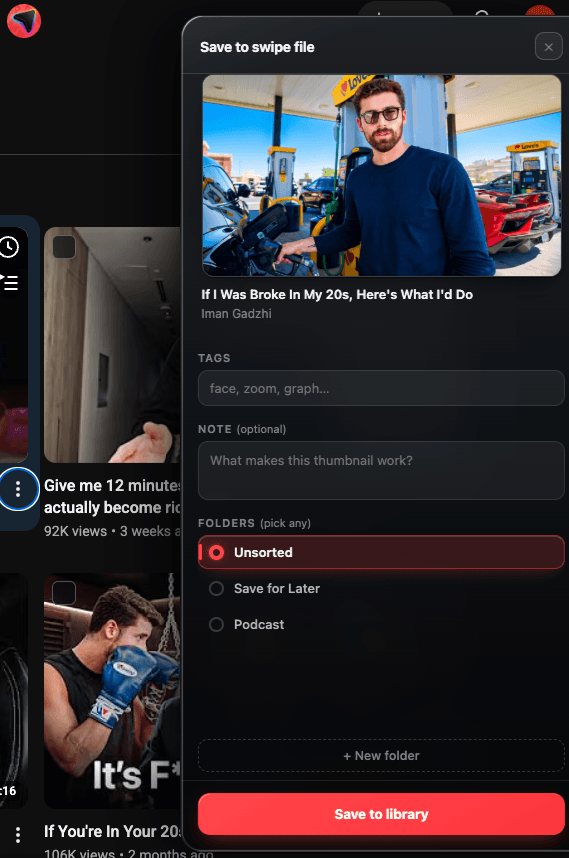
Save to swipe file
Opens a panel on the page showing the thumbnail you're about to save, where you can confirm or cancel before it's added to your library. Use this when you want to double check what's about to be saved — for example, when you've clicked the wrong thumbnail in a crowded grid.
Get color palette
Instantly extracts the thumbnail's six dominant colors and shows them in a panel at the bottom-left of the page, with hex codes you can copy. See Color palette extraction for the full breakdown.
Find similar thumbnails
Pro feature
Opens a search for thumbnails that visually resemble this one. Requires a Pro subscription — free accounts see an upgrade prompt instead.
See Similar Thumbnails for details on how the search works.